
Card Onboarding Requirements: Field Validations and Error States - ProductFTW #94
I’ve built a set of baseline requirements for a new consumer card onboarding flow, and today I’m sharing it
As a product consultant who primarily works in fintech, I’ve implemented many card onboarding flows: debit and credit, with a variety of banks, processors, and KYC providers, built with very different software stacks. No matter what the program looks like, they all share many of the same basic requirements.
What characters should we accept in a name? How should a phone number be formatted? What happens when someone enters a P.O. Box? What happens if a date technically follows the right format but isn’t actually a real date? What should the error say when something goes wrong?
None of these decisions are particularly complicated on their own, but there are a lot of them, and I don’t want to define them from scratch every time. If you don’t make these decisions when you’re writing your requirements, someone will have to make them later (or worse, miss them entirely).
Over time, I’ve built a set of baseline requirements for a new consumer card onboarding flow, and today I’m sharing it. It includes the key fields you need to cover and the exact requirement language I use for each field, so you can copy it into your own requirements and adjust it to your program. Your exact requirements will depend on your program, your bank, your processor, your KYC provider, and any other systems that ultimately need to accept this information.
Start With the Card Onboarding Form
Before getting into the individual fields, I usually define how I expect the onboarding form itself to work. All required fields must be completed before the user can progress; the application should be navigable by touch or keyboard; and errors should appear after the user interacts with a field or attempts to submit the page. If there are unresolved errors, those fields should be visually highlighted so the user knows which fields need to be fixed.
I also define any formatting that should happen as the user types. If I want the phone number displayed as (XXX) XXX-XXXX, the date of birth displayed as MM/DD/YYYY, or the SSN displayed as XXX-XX-XXXX, I write that into the requirements rather than assuming it will be inferred from the design.
There are also requirements that have nothing to do with what the customer sees. For example, I may need to capture the user’s IP address and submit it with the application. I include those in the same requirements because they’re still part of the information we need to successfully submit the application.
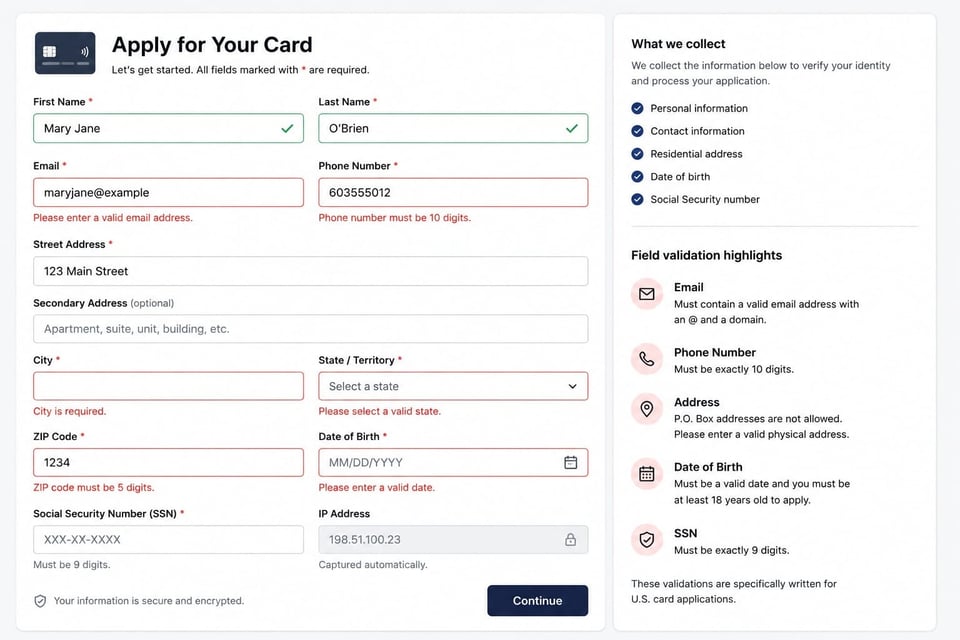
Requirements
All required fields must be completed before the user can progress to the next screen. The application must support navigation by touch and keyboard. Validation errors should appear after field interaction or page submission, rather than before the user interacts with the field. The user must not be able to progress while required fields are incomplete or validation errors remain unresolved. Fields with unresolved errors must be visually highlighted. Inputs should automatically format as specified for each field.
First Name
For first name, I require at least one character and allow up to 40. I allow uppercase and lowercase letters, apostrophes, hyphens, and single spaces between name parts. That supports names like O’Brien or Mary Jane without opening the field up to digits or unrelated special characters.
I don’t allow leading or trailing spaces, and I also explicitly account for entries that technically use allowed characters but aren’t actually names. An entry that consists entirely of spaces or hyphens shouldn’t pass validation just because those characters are allowed within a valid name.
Requirements
Required. Must contain 1 to 40 characters. May include uppercase and lowercase letters (A-Z, a-z), apostrophes, hyphens, and single spaces between name parts. Must not include digits or other special characters. Must not allow leading or trailing spaces. Must not allow input consisting only of spaces or hyphens.
Last Name
I treat last name similarly. It is required to be between 1 and 40 characters and accepts letters, apostrophes, hyphens, and single spaces between name parts.
Again, I don’t allow digits or other special characters, leading or trailing spaces, or an entry made up entirely of spaces or hyphens.
Requirements
Required. Must contain 1 to 40 characters. May include uppercase and lowercase letters (A-Z, a-z), apostrophes, hyphens, and single spaces between name parts. Must not include digits or other special characters. Must not allow leading or trailing spaces. Must not allow input consisting only of spaces or hyphens.
Email is required and can be between three and 255 characters. It needs to contain exactly one @, at least one period after the @, and at least two characters before it. Before the @, I allow letters, digits, and characters such as +, ., _, and -. I also allow subdomains in the domain portion and don’t allow spaces or email addresses that start or end with an @ or a period.