
Why Product Managers Need a Decision Log (+ Free Template) - ProductFTW #95
So you don't waste time reconstructing decisions your team already made.
We’ve talked a lot about how part of the product manager’s role is to translate, document, and communicate all of the things that are happening throughout a project or product lifecycle. You’re pulling together conversations happening across engineering, design, compliance, operations, leadership, vendors, and whoever else is involved so that everyone ultimately understands what we’re doing and why we’re doing it.
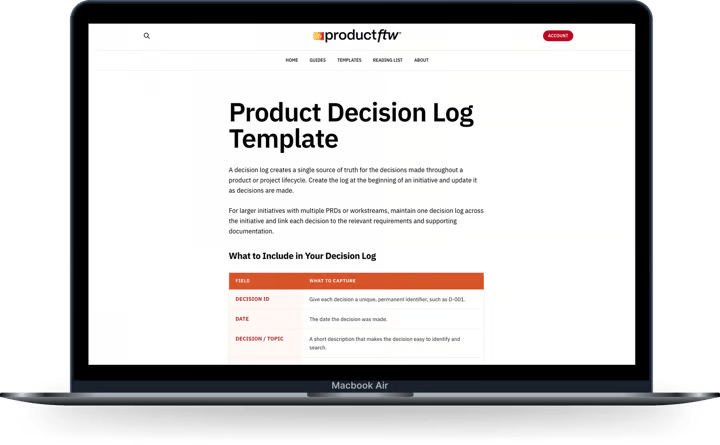
That includes keeping track of decisions being made along the way. The problem is, you usually don’t realize you need to document one until you’re already deep into the project and someone asks a question you know you answered three months ago. You vaguely remember the conversation. Someone else remembers it differently. You know there was a reason you landed where you did, but now you’re searching through Slack, meeting notes, and five different documents trying to figure out what happened.
This is why, before I start any big project, I like to create a decision log.
Create It Before You Need It
A decision log is exactly what it sounds like. It’s one place where you keep track of the decisions made throughout a project's lifecycle, including what you decided, why you decided it, and who was involved.
Create it before you actually feel like you need it. If you wait until the project is well underway, you’ll have to go backward and try to remember all of the decisions you’ve already made. Some will be easy to reconstruct, but plenty of others will have happened during a meeting or a quick conversation and will already be lost.
I find that a spreadsheet is the easiest way to manage this. It doesn’t need to be a complicated system or another massive piece of product documentation that you have to maintain. It can sit in the background of the project and grow as decisions are made.
At first, you’ll probably use it more than you expect, and it might feel overwhelming. That’s when you’ll be making a lot of foundational decisions and figuring out how the product is going to work. As you get further into the project, that starts to slow down, and maintaining the log gets much easier.
What I Keep in the Log
For every decision, I want enough information that someone who wasn’t in the room could come back later and understand what happened. I want to know what question we were trying to answer, what options we considered, what we ultimately decided, why we made that decision, when we made it, and who was involved.
I also want to know who made the decision. There can be a lot of people involved in a conversation without all of those people having the authority to make the final call. You might have Product, Engineering, Compliance, Legal, Operations, and a vendor all contributing information, but ultimately someone needs to own the decision and have the authority to make it.
I also link to any relevant documentation, whether that’s a PRD, a ticket, research, meeting notes, designs, vendor documentation, or something else that provides additional context. The decision log doesn’t need to contain every detail of every conversation. It needs to give you enough information to understand what happened, then point you to the deeper context.
Your PRD Is Still the Source of Truth
Ultimately, these decisions should be reflected in your product requirements. If you decide that a customer has to do X before they can do Y, the PRD should reflect that. The decision log shouldn’t become a second set of requirements that your team now has to keep in sync.
What the decision log gives you is the history behind those requirements.
This is especially useful when you’re working on a large initiative because you may have several PRDs. In fintech, I tend to create multiple because a single one can get unruly very quickly. Onboarding might be one PRD, while transaction management is another. Depending on the program, you might also have separate requirements for servicing, rewards, repayment, disputes, or other major components of the experience.
The problem is that the decisions you’re making don’t necessarily fit neatly into those same buckets. A decision you make about onboarding might have implications for transaction management. Something Compliance decides might affect three different areas of the product. The decision log can span all those PRDs and give you a single place to understand how you arrived at the current set of requirements.
You Still Need to Own the Actual Record
I’ve written recently about one of the problems with going back and forth with AI over and over again. The longer the conversation goes on and the more information you introduce, the easier it becomes for things to get muddied. AI can start interpreting something differently, combining information that shouldn’t be combined, or giving you an answer that sounds right even though it isn’t actually what you originally decided.
I don’t want that happening to the historical record of a project.
Keep the actual decision log outside of AI, somewhere you control and can preserve. AI can help you create entries and interact with the information, but you are responsible for ensuring the log is accurate and that new decisions don’t change the history of previous ones.
If a decision changes, that’s fine. Decisions change all the time as you learn more. When this happens, create a new decision and link it back to the original rather than rewriting what happened. That way, six months from now, you can see that you originally decided X, what information you had at the time, and why you later changed the decision to Y.
Where I Think AI Gets Really Useful
The part of this that I find most useful isn’t having AI format the decisions. It’s being able to chat with the decision log once it starts getting really, really long.
Before I start another conversation, I want to be able to ask, “Have we made this decision yet?” I want AI to tell me yes or no and, if we have, show me the decision, why we made it, and anything else in the log that seems similar or related.
That is incredibly valuable on a project that has been going on for six months or a year. You won’t remember every decision that was made, and you won’t remember every conversation that led to those decisions. Someone new joining the project certainly won’t either.
AI can also help with broader questions. What decisions have we made about onboarding? Have we made any that affect this requirement? Why did we decide not to support this? Was Compliance involved in this decision? Have we talked about something similar before?
The important distinction is that AI is searching and helping you understand a record that you own. It isn’t becoming the record itself.
About ProductFTW
ProductFTW is a weekly newsletter about product management, with a focus on real-life experiences in startups. We want to help product leaders be successful by giving realistic approaches that aren’t for giant tech companies. We know you don’t have a full-time product designer on each team. We know your software probably hasn’t been used by millions of people worldwide–yet. We’re here to bridge the content gap from building your product and team to scaling it.